
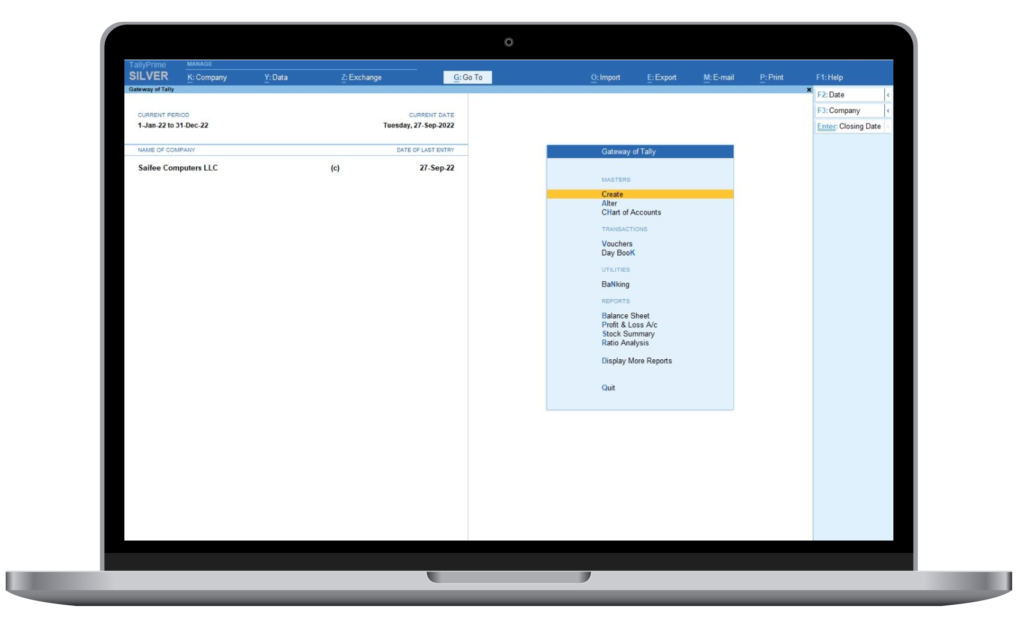
Why do we need a Closing Date?
- Would you like complete control of your Accounting Data in Tally Prime?
- Do you want to avoid mismatch of accounts after VAT filing & Audit which results in loss of time & effort of your team?
- Do you want to stop your team from making wrong dated entries that can save hours of work in trying to find the mistake later?
Mismatch of accounts after VAT filing & Audit are costly mistakes resulting in loss of time & effort of your team. Stopping one wrong entry can save hours of work in trying to find the mistake later.
How does this feature work?
This feature will help you to:
- Give you an option to establish full control of accounts data with one click
- Stop new transactions entry in closed periods
- Stop editing and deleting of transactions from closed periods
Get Peace of Mind knowing that you can avoid data entry mistakes
End User Benefits
| User Type | Benefit of Using “Closing Date Add-on” |
|
|
|
|
|
|
|
|
Business Benefits
| Business Problem | Benefit of This Add-On |
|
|
|
|
|
|
|
|
|
|
Frequently Asked Questions
Yes, its possible
- This would result in generating reports from multiple databases when multiple years need to be reported and then combining reports manually in Excel
- With Closing Date Add-on you can keep the same database and block changes in closed years Also the yearly data split does not help control the data changes in closed VAT quarters/months.
- Tally provides a feature for “Cut-off date for back dated vouchers”. But the Admin & Owner user roles can still make changes in any open year / period.
- With Closing Date Add-on you can control the changes even for Admin & Owner user roles.
SaaS-Based vs Cloud-Based: What’s the Difference?
Two terminologies that often get tossed around are saas cloud applications (Software as a Service) and Cloud-Based. While they might seem interchangeable, these terms represent distinct facets of the digital space, each offering a unique set of advantages and applications. The cloud is a space where data and applications float effortlessly, accessible from anywhere with […]
Ensuring Data Safety in Dubai’s Cloud Services
As organizations and individuals embrace cloud services, ensuring data safety is the first step to prioritizing a secure digital future. We’ll explore the strategies and measures to safeguard cloud services in Dubai by taking cloud services in Dubai. Strong Encryption Encryption is the first step in establishing data safety. Encryption technologies facilitate end-to-end encryption that […]
How ERP Software is Reshaping the Financial Landscape
In the fast-paced world of finance, efficiency and accuracy are paramount. Enterprise Resource Planning (ERP) software has emerged as a game-changer, reshaping the financial landscape by streamlining processes, enhancing decision-making, and fostering a new era of financial management. Let's delve into the various facets that highlight how ERP software for banking industry is revolutionizing financial [...]
 Zain Ali2023-03-25Best Service ever. Clear all my doubts Helped me a lot.Ashraf Rateb2023-02-27Quick service & experienced team. Service changes are competitiveShabbir Sabir2023-01-31Professional Team and they know their job.jamseena ps2022-11-11Excellent team work and best ever ERP. consultant especially danish.Mohamed Shaheer Poozhikunnath2022-11-11Very easy to access 👍


